This blog series will explain how to write a component library for Thymeleaf. The goal is to create a library that can be used in any Spring Boot application that uses Thymeleaf as the view technology. Users of the library should be able to use the components to quickly build a user interface without having to write a lot of HTML and CSS themselves.
|
This blog post is part of a series:
|
Design goals
The library has the following design goals:
-
The library should auto-configure any beans that are needed to use the components.
-
The library should be easy to use and require minimal configuration.
-
When authoring a component, the developer should be able to focus on the component itself and not have to worry about the integration with Spring Boot or Thymeleaf.
-
During development, live reload should allow rapid iteration on the components without having to restart the application.
-
The library should be able to use CSS and/or JavaScript libraries.
Getting started
We start the library as we do with any Spring Boot starter.
Create a minimal pom.xml file:
<?xml version="1.0" encoding="UTF-8"?>
<project xmlns="http://maven.apache.org/POM/4.0.0"
  xmlns:xsi="http://www.w3.org/2001/XMLSchema-instance"
  xsi:schemaLocation="http://maven.apache.org/POM/4.0.0 http://maven.apache.org/xsd/maven-4.0.0.xsd">
  <modelVersion>4.0.0</modelVersion>

  <groupId>com.wimdeblauwe.examples</groupId>
  <artifactId>thymeleaf-component-library</artifactId>
  <version>0.0.1-SNAPSHOT</version>
  <name>Thymeleaf Component Library</name>

  <properties>
    <project.build.sourceEncoding>UTF-8</project.build.sourceEncoding>
    <java.version>25</java.version>

    <!-- Dependencies -->
    <spring-boot.version>4.1.0</spring-boot.version>

    <!-- Maven plugins -->
    <maven-compiler-plugin.version>3.15.0</maven-compiler-plugin.version>
    <maven-surefire-plugin.version>3.5.6</maven-surefire-plugin.version>
  </properties>
  <dependencyManagement>
    <dependencies>
      <dependency>
        <groupId>org.springframework.boot</groupId>
        <artifactId>spring-boot-dependencies</artifactId>
        <version>${spring-boot.version}</version>
        <type>pom</type>
        <scope>import</scope>
      </dependency>
    </dependencies>
  </dependencyManagement>
  <dependencies>
    <dependency>
      <groupId>org.springframework.boot</groupId>
      <artifactId>spring-boot-starter-thymeleaf</artifactId>
    </dependency>

    <dependency>
      <groupId>org.springframework.boot</groupId>
      <artifactId>spring-boot-starter-thymeleaf-test</artifactId>
      <scope>test</scope>
    </dependency>
  </dependencies>
  <build>
    <plugins>
      <plugin>
        <groupId>org.apache.maven.plugins</groupId>
        <artifactId>maven-compiler-plugin</artifactId>
        <version>${maven-compiler-plugin.version}</version>
        <configuration>
          <release>${java.version}</release>
          <annotationProcessorPaths>
            <path>
              <groupId>org.springframework.boot</groupId>
              <artifactId>spring-boot-configuration-processor</artifactId>
            </path>
            <path>
              <groupId>org.springframework.boot</groupId>
              <artifactId>spring-boot-autoconfigure-processor</artifactId>
            </path>
          </annotationProcessorPaths>
        </configuration>
      </plugin>
      <plugin>
        <artifactId>maven-surefire-plugin</artifactId>
        <version>${maven-surefire-plugin.version}</version>
        <configuration>
          <redirectTestOutputToFile>true</redirectTestOutputToFile>
          <printSummary>true</printSummary>
        </configuration>
      </plugin>
    </plugins>
  </build>
</project>Run pnpm init --bare to create a package.json file and then run pnpm add -D vite to add Vite as a dependency.
This should create a package.json file like this:
{
  "devEngines": {
    "packageManager": {
      "name": "pnpm"
    }
  },
  "type": "module",
  "devDependencies": {
    "vite": "^8.1.4"
  }
}|
By default I like to remove them as this sometimes gives strange errors after upgrading pnpm to a new version. |
There will also be a pnpm-lock.yaml file and a node_modules directory created.
Configure Vite by creating a vite.config.js file in the root of the project with the following content:
import {defineConfig} from 'vite';

export default defineConfig({
  root: path.join(__dirname, 'src/main/resources/static'),
  server: { (1)
    port: 5174,
    strictPort: true,
    cors: true,
    origin: 'http://localhost:5174'
  },
  build: {
    manifest: true, (2)
    rolldownOptions: {
      input: { (3)
        'tcl-css': path.join(__dirname, 'src/main/resources/static/css/tcl.css'),
        'tcl-js': path.join(__dirname, 'src/main/resources/static/js/tcl.js'),
      }
    },
    outDir: path.join(__dirname, 'target/classes/META-INF/resources/tcl'), (4)
    copyPublicDir: false (5)
  },
});| 1 | Configuration of the Vite development server for live reloading.
The origin property is needed to allow the Spring Boot application to make requests to the Vite development server. |
| 2 | Generate a manifest file that maps the original file names to the hashed file names that are generated by Vite. The Spring Boot application will use this manifest file to load the correct files in production. |
| 3 | Configure the input files for the build. The tcl-css and tcl-js files will be the entry points for the CSS and JavaScript files of the component library. |
| 4 | Configure the output directory for the build. The files will be copied to the target/classes/META-INF/resources/tcl directory so that they can be served by Spring Boot. |
| 5 | Vite copies files from public to the output directory by default. We don’t want that, so we disable it. |
To run the Vite build, we add 2 scripts to package.json:
{
  ...
  "scripts": {
    "dev": "vite",
    "build": "vite build"
  }
}
Auto-configuration
To make our library an idiomatic Spring Boot starter, we need to add an auto-configuration class:
package com.wimdeblauwe.examples.tcl;

import org.springframework.boot.autoconfigure.AutoConfiguration;
import org.springframework.boot.context.properties.EnableConfigurationProperties;

@AutoConfiguration
@EnableConfigurationProperties(TclProperties.class)
public class TclAutoConfiguration {

}
It is empty for now, but we will add some beans to it later.
It also references a TclProperties class that we need to create:
package com.wimdeblauwe.examples.tcl;

import org.springframework.boot.context.properties.ConfigurationProperties;

@ConfigurationProperties(prefix = "tcl")
public record TclProperties() {

}
Also still empty for now, but we will add some properties to it later.
As a final step, we add 2 files to the src/main/resources/META-INF/spring directory:
-
org.springframework.boot.autoconfigure.AutoConfiguration.importswith the full qualified name of the auto-configuration class:com.wimdeblauwe.examples.tcl.TclAutoConfiguration -
org.springframework.boot.webmvc.test.autoconfigure.AutoConfigureMockMvc.importswith the same content:com.wimdeblauwe.examples.tcl.TclAutoConfiguration
The first file is used by Spring Boot to load the auto-configuration class when the library is on the classpath of a Spring Boot application.
The second file will also load this auto-configuration class when running tests with @WebMvcTest in a Spring Boot application that uses this library.
Vite assets setup
To make sure we can use the CSS and JS files, we will auto-configure a TclAssets bean that will provide the correct URLs for the CSS and JS files.
Create src/main/resources/static/css/tcl.css and src/main/resources/static/js/tcl.js files with some dummy content:
body {
  color: red;
}
function test() {
console.log('test');
}
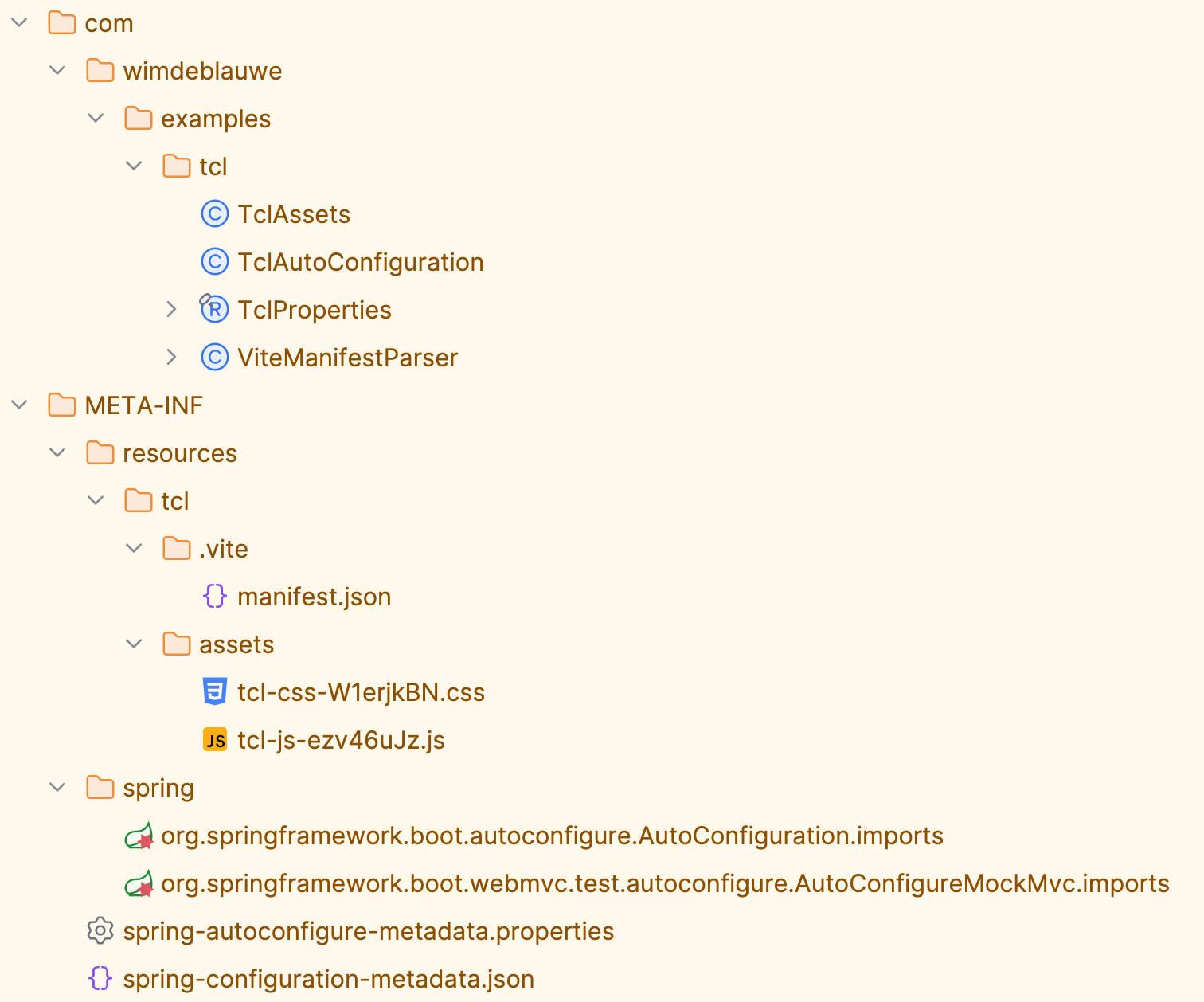
test();If you now run pnpm run build, you should see the following files in target/classes/META-INF/resources/tcl:
-
.vite/manifest.json -
assets/tcl-css.[hash].css -
assets/tcl-js.[hash].js
The manifest file looks like this:
{
  "src/main/resources/static/css/tcl.css": {
    "file": "assets/tcl-css-W1erjkBN.css",
    "name": "tcl-css",
    "names": [
      "tcl-css.css"
    ],
    "src": "src/main/resources/static/css/tcl.css",
    "isEntry": true
  },
  "src/main/resources/static/js/tcl.js": {
    "file": "assets/tcl-js-ezv46uJz.js",
    "name": "tcl-js",
    "src": "src/main/resources/static/js/tcl.js",
    "isEntry": true
  }
}
This is the Vite output in build mode, which is the mode that will be used in production.
When Vite is running in dev mode, there is no manifest file. The assets are served directly from the Vite development server, which is running on port 5174.
To read the Vite manifest file, we first create a small helper class ViteManifestParser:
import java.io.IOException;
import java.io.InputStream;
import java.util.Collections;
import java.util.List;
import java.util.Map;
import org.springframework.core.io.Resource;
import tools.jackson.core.type.TypeReference;
import tools.jackson.databind.json.JsonMapper;

public class ViteManifestParser {

  private final JsonMapper jsonMapper;

  public ViteManifestParser(JsonMapper jsonMapper) {
    this.jsonMapper = jsonMapper;
  }

  public ViteManifest parse(Resource resource) throws IOException {
    try (InputStream inputStream = resource.getInputStream()) {
      Map<String, ViteManifestEntry> entries =
          jsonMapper.readValue(inputStream, new TypeReference<>() {
          });
      return new ViteManifest(entries);
    }
  }

  public record ViteManifest(Map<String, ViteManifestEntry> entries) {

    public ViteManifestEntry getEntry(String key) {
      ViteManifestEntry entry = entries.get(key);
      if (entry == null) {
        throw new IllegalArgumentException("No entry found for key %s. Known entries: %s".formatted(key, entries.keySet()));
      }
      return entry;
    }
  }

  public record ViteManifestEntry(String file, String src, boolean isEntry, List<String> css, List<String> imports) {

    public ViteManifestEntry(String file, String src, boolean isEntry, List<String> css, List<String> imports) {
      this.file = file;
      this.src = src;
      this.isEntry = isEntry;
      this.css = css != null ? css : Collections.emptyList();
      this.imports = imports != null ? imports : Collections.emptyList();
    }
  }
}
Using this class, we can now create a TclAssets bean that will provide the correct URLs for the CSS and JS files:
package com.wimdeblauwe.examples.tcl;

import com.wimdeblauwe.examples.tcl.ViteManifestParser.ViteManifest;
import java.io.IOException;
import java.util.Objects;
import org.jspecify.annotations.Nullable;
import org.springframework.core.io.ClassPathResource;
import org.springframework.util.StringUtils;

public class TclAssets {

  private static final String MANIFEST_LOCATION = "META-INF/resources/tcl/.vite/manifest.json";
  private static final String BASE_URL = "/tcl/";
  private static final String MANIFEST_KEY_BASE_PATH = "src/main/resources/static/";
  private static final String CSS_MANIFEST_KEY = MANIFEST_KEY_BASE_PATH + "css/tcl.css";
  private static final String JS_MANIFEST_KEY = MANIFEST_KEY_BASE_PATH + "js/tcl.js";

  private boolean devMode;
  private String cssUrl;
  private String jsUrl;
  private String viteClientUrl;

  public TclAssets(@Nullable String viteServerUrl,
      ViteManifestParser viteManifestParser) {
    if (StringUtils.hasText(viteServerUrl)) {
      buildAssetsInDevMode(Objects.requireNonNull(viteServerUrl));
    } else {
      buildAssetsInBuildMode(viteManifestParser);
    }
  }

  public boolean isDevMode() {
    return devMode;
  }

  public String getCssUrl() {
    return cssUrl;
  }

  public String getJsUrl() {
    return jsUrl;
  }

  public String getViteClientUrl() {
    return viteClientUrl;
  }

  private void buildAssetsInDevMode(String viteServerUrl) { (1)
    String base = stripTrailingSlash(viteServerUrl.trim());
    this.devMode = true;
    this.cssUrl = base + "/css/tcl.css";
    this.jsUrl = base + "/js/tcl.js";
    this.viteClientUrl = base + "/@vite/client";
  }

  private void buildAssetsInBuildMode(ViteManifestParser viteManifestParser) { (2)
    this.devMode = false;
    try {
      ClassPathResource resource = new ClassPathResource(MANIFEST_LOCATION);
      if(!resource.exists()) {
        throw new IllegalStateException("Failed to read the Vite manifest at '" + MANIFEST_LOCATION + "'.");
      }
      ViteManifest manifest = viteManifestParser.parse(resource);
      this.cssUrl = BASE_URL + manifest.getEntry(CSS_MANIFEST_KEY).file();
      this.jsUrl = BASE_URL + manifest.getEntry(JS_MANIFEST_KEY).file();
      this.viteClientUrl = null;
    } catch (IOException e) {
      throw new IllegalStateException(
          "Failed to read the Vite manifest at '" + MANIFEST_LOCATION + "'.", e);
    }
  }

  private static String stripTrailingSlash(String url) {
    return url.endsWith("/") ? url.substring(0, url.length() - 1) : url;
  }
}| 1 | When the viteServerUrl property is set, we are in development mode and the assets are served from the Vite development server. |
| 2 | When the viteServerUrl property is not set, we are in build mode and the assets are served from the Spring Boot application.
To find the correct URLs for the assets, we read the Vite manifest file generated during the build. |
Finally, update the TclAutoConfiguration class to create a TclAssets bean:
import org.springframework.boot.autoconfigure.AutoConfiguration;
import org.springframework.boot.autoconfigure.condition.ConditionalOnMissingBean;
import org.springframework.boot.context.properties.EnableConfigurationProperties;
import org.springframework.context.annotation.Bean;
import tools.jackson.databind.json.JsonMapper;

@AutoConfiguration
@EnableConfigurationProperties(TclProperties.class)
public class TclAutoConfiguration {

  @Bean
  @ConditionalOnMissingBean
  public TclAssets tclAssets(TclProperties properties,
      ViteManifestParser viteManifestParser) {
    return new TclAssets(properties.dev().viteServerUrl(), viteManifestParser);
  }

  @Bean
  @ConditionalOnMissingBean
  public ViteManifestParser viteManifestParser(JsonMapper jsonMapper) {
    return new ViteManifestParser(jsonMapper);
  }
}
The server url of the Vite development server can be configured via the tcl.dev.vite-server-url property:
import org.springframework.boot.context.properties.ConfigurationProperties;
import org.springframework.boot.context.properties.bind.DefaultValue;

@ConfigurationProperties(prefix = "tcl")
public record TclProperties(@DefaultValue DevProperties dev) {

  record DevProperties(String viteServerUrl) {

  }
}
To make it easy for the users of our library to use the assets, we create a tcl/layout :: head fragment that can be included in the <head> of the HTML page:
<!DOCTYPE html>
<html xmlns:th="http://www.thymeleaf.org">
<!--
  Public asset entry point for consuming applications.

  Usage in a consumer template:
    <head>
      <th:block th:replace="~{tcl/layout :: head}"></th:block>
    </head>
-->
<head>
    <th:block th:fragment="head">
    <th:block th:if="${@tclAssets.devMode}"> (1)
      <script type="module" th:with="viteClientUrl=${@tclAssets.viteClientUrl}"
              th:src="${viteClientUrl}"></script>
    </th:block>
    <link rel="stylesheet" th:with="url=${@tclAssets.cssUrl}" th:href="@{${url}}"/>
    <script type="module" th:with="url=${@tclAssets.jsUrl}" th:src="@{${url}}"></script>
  </th:block>
</head>
<body>
</body>
</html>| 1 | Only add the Vite client script when in development mode. |
Note how the fragment uses the TclAssets bean to get the correct URLs for the CSS and JS files.
When in development mode, it loads the assets from the Vite development server.
When in build mode, it loads the assets from the library jar.
We will now set up Maven correctly, so we have a jar we can test in a sample application.
Frontend maven plugin
To make sure the Vite build is run when building the library with Maven, we can use the frontend-maven-plugin.
Adjust the pom.xml file to add the plugin:
<project>
  ...
  <properties>
    ...
    <frontend-maven-plugin.version>2.0.1</frontend-maven-plugin.version>
    <frontend-maven-plugin.nodeVersion>v24.18.0</frontend-maven-plugin.nodeVersion>
    <frontend-maven-plugin.pnpmVersion>11.13.0</frontend-maven-plugin.pnpmVersion>
  </properties>
  <build>
    <resources>
      <resource>
        <directory>src/main/resources</directory>
        <excludes>
          <exclude>static/**/*.css</exclude>
          <exclude>static/**/*.js</exclude>
        </excludes>
      </resource>
    </resources>
    <plugins>
      ...
      <plugin>
        <groupId>com.github.eirslett</groupId>
        <artifactId>frontend-maven-plugin</artifactId>
        <version>${frontend-maven-plugin.version}</version>
        <executions>
          <execution>
            <id>install-node-and-pnpm</id>
            <goals>
              <goal>install-node-and-pnpm</goal>
            </goals>
            <phase>generate-resources</phase>
            <configuration>
              <nodeVersion>${frontend-maven-plugin.nodeVersion}</nodeVersion>
              <pnpmVersion>${frontend-maven-plugin.pnpmVersion}</pnpmVersion>
            </configuration>
          </execution>
          <execution>
            <id>pnpm-install</id>
            <goals>
              <goal>pnpm</goal>
            </goals>
            <phase>generate-resources</phase>
            <configuration>
              <arguments>install</arguments>
            </configuration>
          </execution>
          <execution>
            <id>pnpm-build</id>
            <goals>
              <goal>pnpm</goal>
            </goals>
            <phase>generate-resources</phase>
            <configuration>
              <arguments>run build</arguments>
            </configuration>
          </execution>
        </executions>
      </plugin>
    </plugins>
  </build>
</project>
There are three parts to change:
-
Add version properties for the plugin, Node.js and pnpm.
-
Exclude the CSS and JS files from the resources so that they are not copied to the
target/classesdirectory by the Maven resources plugin. We don’t want the source files to be copied as Vite will generate the files with hashed names in thetarget/classes/META-INF/resources/tcldirectory. -
Add the plugin configuration to install Node.js and pnpm, run
pnpm installand runpnpm run buildduring thegenerate-resourcesphase of the Maven build.
Run mvn clean install to build the jar and install it into your local Maven repository.
The jar should contain the following files:
Test application
We need a way to test our component library so let’s create a test application that uses the library.
Install ttcli if you don’t have it yet.
Create a samples directory inside the library.
Run ttcli init to create a new Spring Boot application and select the following options:
-
Group:
com.wimdeblauwe.examples.tcl -
Artifact:
tcl-sample-01 -
Project name:
TCL Sample App 1 -
Spring Boot version:
4.1.0 -
Java version:
25 -
Template engine:
Thymeleaf -
Live reload:
Vite -
Package manager:
pnpm -
Web dependencies:
AlpineJS,htmx
After the project is generated, add our library as a dependency in the pom.xml file of the sample application:
    <dependency>
      <groupId>com.wimdeblauwe.examples</groupId>
      <artifactId>thymeleaf-component-library</artifactId>
      <version>0.0.1-SNAPSHOT</version>
    </dependency>
Update the src/main/resources/templates/layout/main.html file to include the CSS and JS from the libray using the tcl/layout :: head fragment:
<head>
  <meta charset="UTF-8">
  <meta name="viewport" content="width=device-width, initial-scale=1">
  <title></title>
  <th:block th:replace="~{tcl/layout :: head}"></th:block>
  <vite:client></vite:client>
  <vite:vite>
    <vite:entry value="/css/application.css"></vite:entry>
  </vite:vite>
</head>
Now run the application:
-
Start the Vite development server in the sample project directory:
pnpm run dev -
Start the Spring Boot application using the
localprofile:mvn spring-boot:run -Dspring-boot.run.profiles=local. You can also run the application directly from your IDE, but make sure to set thelocalprofile and set the working directory to the root of the sample project.
Open your browser and go to http://localhost:8080.
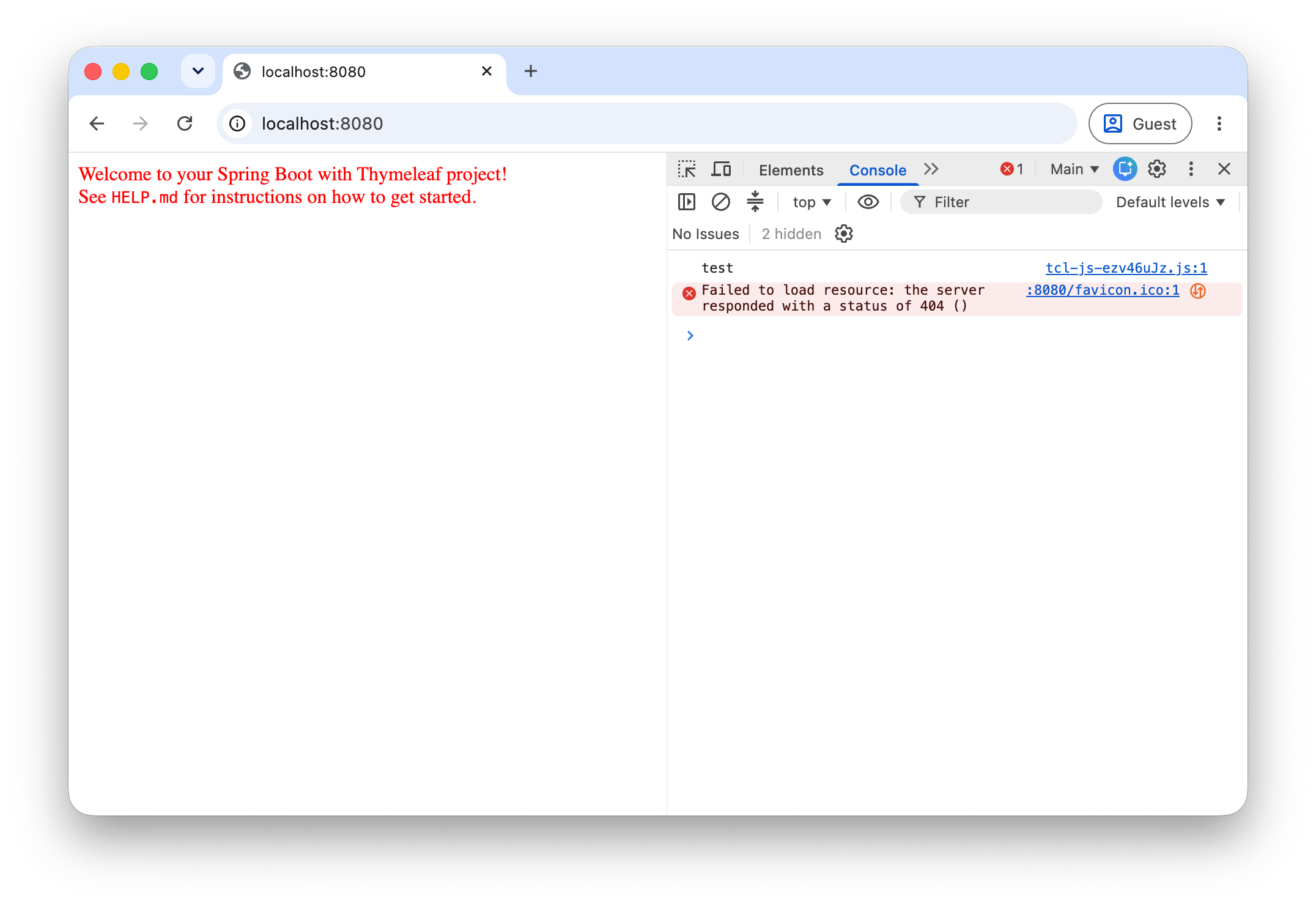
If everything is ok, the text on the page should be red, due to the CSS we added to the library.
Next, open the developer tools in your browser and check the console output.
You should see the test message from the JS file in the library.
Live reload of CSS and JS files
Building the library each time via Maven is annoying and slow. That is why we added this tcl.dev.vite-server-url property to the TclProperties class.
When this property is set, the library will load the CSS and JS files from the Vite development server instead of from the jar.
Set the property in the application-local.properties file of the sample application:
spring.thymeleaf.cache=false
spring.web.resources.chain.cache=false

tcl.dev.vite-server-url=http://localhost:5174

vite.mode=dev
Now do these 3 steps:
-
Start the Vite development server in the library project directory:
pnpm run dev -
Start the Vite development server in the sample project directory:
pnpm run dev -
Start the Spring Boot application using the
localprofile:mvn spring-boot:run -Dspring-boot.run.profiles=local.
Open the browser and go to http://localhost:8080.
Now change the color in the src/main/resources/static/css/tcl.css file of the library project and save the file.
The browser should automatically reload and you should see the new color.
The same works for the JS file. Change the test message in the src/main/resources/static/js/tcl.js file of the library project and save the file.
The web console should automatically show the new message.
It is also possible to adjust the sample specific CSS (and JS) files in the sample project and have them automatically reloaded in the browser.
This is possible because we have 2 Vite development servers running, one for the library and one for the sample application. If you check the HTML source in the browser, you will see this:
<head>
  <script type="module" src="http://localhost:5174/@vite/client"></script>
  <link rel="stylesheet" href="http://localhost:5174/css/tcl.css">
  <script type="module" src="http://localhost:5174/js/tcl.js"></script>

  <script type="module" src="//localhost:5173/@vite/client"></script>
  <link rel="stylesheet" href="//localhost:5173/static/css/application.css">
</head>
The links using port 5174 are the assets from the library and the links using port 5173 are the assets from the sample application.
Conclusion
This blog post explained how to set up a Thymeleaf component library that can be used in a Spring Boot application. We used the library in build mode in a sample application and verified that the CSS and JS files were loaded correctly.
The next step will be to write an actual component and use it in the sample application.
This will be done in part 2 of this blog series.
If you have any questions or remarks, feel free to post a comment at GitHub discussions.