In part 1 we created a Thymeleaf component library that can be used in a Spring Boot application. Part 2 showed how to create an actual component with custom attributes and a passthrough of any attribute. In part 3 we will add support for slots, which allows to add arbitrary content inside a component.
Slot support
A "slot" is what most component libraries call a placeholder for arbitrary content inside a component. For example, we want to be able to use the button component like this:
<tcl:button primary>Submit</tcl:button>By using a slot, we can allow the user to add an SVG for the button icon, or any other content inside the button:
<tcl:button primary>
  <div>
      <!-- Trash icon from https://heroicons.com/ -->
      <svg xmlns="http://www.w3.org/2000/svg" fill="none" viewBox="0 0 24 24" stroke-width="1.5"
           stroke="currentColor">
        <path stroke-linecap="round" stroke-linejoin="round"
              d="m14.74 9-.346 9m-4.788 0L9.26 9m9.968-3.21c.342.052.682.107 1.022.166m-1.022-.165L18.16 19.673a2.25 2.25 0 0 1-2.244 2.077H8.084a2.25 2.25 0 0 1-2.244-2.077L4.772 5.79m14.456 0a48.108 48.108 0 0 0-3.478-.397m-12 .562c.34-.059.68-.114 1.022-.165m0 0a48.11 48.11 0 0 1 3.478-.397m7.5 0v-.916c0-1.18-.91-2.164-2.09-2.201a51.964 51.964 0 0 0-3.32 0c-1.18.037-2.09 1.022-2.09 2.201v.916m7.5 0a48.667 48.667 0 0 0-7.5 0"/>
      </svg>
  </div>
</tcl:button>
To make this work, we will allow to add a <tcl:slot> element anywhere inside the component template.
The content of the <tcl:slot> element will be replaced with the content of the component element when the component is used.
<!doctype html>
<html xmlns:th="http://www.thymeleaf.org" xmlns:tcl="http://www.w3.org/1999/xhtml">
<body>
  <button th:fragment="button"
          th:with="primary=${attrs != null and attrs.containsKey('primary') and attrs.get('primary') != 'false'}"
          class="tcl-button"
          th:classappend="${primary ? 'tcl-button--primary' : ''}"
          tcl:attrsExcept="primary">
    <tcl:slot>Label</tcl:slot> (1)
  </button>
</body>
</html>| 1 | The <tcl:slot> element will be replaced with the content of the component element when the component is used. |
Some components may have multiple slots, for example, a tcl:card component may have a header and footer slot, next to the default slot for the body.
For that reason, we will allow to give a name to the slot using the name attribute:
<div th:fragment="card" class="tcl-card" tcl:attrsExcept="">
  <tcl:slot name="header">Header</tcl:slot>
  <tcl:slot>Body</tcl:slot>
  <tcl:slot name="footer"></tcl:slot>
</div>
In this fragment, the header and the default slot have default content, while the footer slot is empty by default.
When using the component, we can specify the content for each slot using the tcl:slot attribute:
<tcl:card>
  <tcl:slot name="header">My card header</div>
  My card body
  <tcl:slot name="footer">My card footer</div>
</tcl:card>
The implementation of this needs two parts.
The ComponentElementProcessor needs to gather the element body (for the default slot), and any named slots' content from where the component is used.
Then a SlotElementProcessor needs to replace the <tcl:slot> elements in the component template with the content of the corresponding slot.
We start with a helper class to gather the slots' content:
package com.wimdeblauwe.examples.tcl.processor;
import java.util.LinkedHashMap;
import java.util.Map;
import org.jspecify.annotations.Nullable;
import org.thymeleaf.model.ICloseElementTag;
import org.thymeleaf.model.IModel;
import org.thymeleaf.model.IModelFactory;
import org.thymeleaf.model.IOpenElementTag;
import org.thymeleaf.model.IProcessableElementTag;
import org.thymeleaf.model.ITemplateEvent;
/**
* Splits a component element's body into the <strong>default slot</strong> and the
* <strong>named</strong> {@code <tcl:slot name="...">} blocks.
*
* <p>The body is walked exactly once. Every event is routed to a single "target" model: normally
* the default slot, or – between a top-level {@code <tcl:slot name="x">} and its matching
* close tag – the named slot being captured. The {@code <tcl:slot>} wrapper tags themselves
* are consumed, never emitted.
*
* <p>Two nesting rules keep ownership straight:
*
* <ul>
* <li>A named slot found inside a <em>nested component</em> ({@code componentDepth > 0}) belongs
* to that inner component, so it stays in the default slot untouched.
* <li>A {@code <tcl:slot>} found inside a slot being <em>captured</em> ({@code slotDepth}) is
* part of that slot's content, so it is copied verbatim.
* </ul>
*/
final class SlotContentSplitter {
private final String dialectPrefix;
SlotContentSplitter(String dialectPrefix) {
this.dialectPrefix = dialectPrefix;
}
/**
* Splits the body of {@code element} (everything between its open and close tag) returning the
* default slot and the named slots, in authoring order.
*/
SlotContent split(IModel element, IModelFactory modelFactory) {
return new ElementBodyWalker(modelFactory).split(element);
}
/** The result of a split: the default slot body and the named slots, in authoring order. */
record SlotContent(IModel defaultSlot, Map<String, IModel> namedSlots) {}
/** The mutable state of a single walk over a component body. */
private final class ElementBodyWalker {
private final IModelFactory modelFactory;
private final IModel defaultSlot;
private final Map<String, IModel> namedSlots = new LinkedHashMap<>();
/** The named slot currently being captured, or {@code null} while routing to the default. */
private @Nullable IModel capturedSlot;
// Depth of nested tcl:* component elements while routing to the default slot.
private int componentDepth;
// Depth of nested <tcl:slot> elements while capturing a named slot's content.
private int slotDepth;
private ElementBodyWalker(IModelFactory modelFactory) {
this.modelFactory = modelFactory;
this.defaultSlot = modelFactory.createModel();
}
private SlotContent split(IModel element) {
for (int i = 1; i < element.size() - 1; i++) {
ITemplateEvent event = element.get(i);
if (capturedSlot != null) {
// We are currently inside a named slot being captured.
// Capture everything up to the matching </tcl:slot> tag.
capture(event, capturedSlot);
} else {
route(event);
}
}
return new SlotContent(defaultSlot, namedSlots);
}
/** Capturing a named slot: copy everything up to the matching {@code </tcl:slot>}. */
private void capture(ITemplateEvent event, IModel slot) {
if (isSlotClose(event) && slotDepth == 0) {
capturedSlot = null; // matching close tag; consume it and stop capturing
return;
}
if (isSlotOpen(event)) {
slotDepth++;
} else if (isSlotClose(event)) {
slotDepth--;
}
slot.add(event);
}
/**
* Routing to the default slot: divert to a new named slot on a top-level {@code <tcl:slot>}.
*/
private void route(ITemplateEvent event) {
boolean shouldSearchForNamedSlots = componentDepth == 0;
String slotName = shouldSearchForNamedSlots ? namedSlotName(event) : null;
if (slotName != null) {
// A named slot was found, create a new empty model for the body of the named slot.
IModel content = modelFactory.createModel();
namedSlots.put(slotName, content);
if (event instanceof IOpenElementTag) {
capturedSlot = content; // <tcl:slot name="x">...</tcl:slot>: capture until the close
}
// No capture for a standalone <tcl:slot name="x"/>: it stays an empty named slot.
} else {
if (isComponentOpen(event)) {
componentDepth++;
} else if (isComponentClose(event)) {
componentDepth--;
}
defaultSlot.add(event);
}
}
/** Returns the {@code name} of an {@code <tcl:slot name="...">} event, or {@code null}. */
private @Nullable String namedSlotName(ITemplateEvent event) {
if (event instanceof IProcessableElementTag tag
&& isSlotElement(tag.getElementCompleteName())) {
String name = tag.getAttributeValue("name");
return (name == null || name.isBlank()) ? null : name;
}
return null;
}
private boolean isSlotOpen(ITemplateEvent event) {
return event instanceof IOpenElementTag open && isSlotElement(open.getElementCompleteName());
}
private boolean isSlotClose(ITemplateEvent event) {
return event instanceof ICloseElementTag close
&& isSlotElement(close.getElementCompleteName());
}
private boolean isSlotElement(String completeName) {
return completeName.equals(dialectPrefix + ":slot");
}
/** An {@code <tcl:NAME>} open tag for a nested component (anything but {@code <tcl:slot>}). */
private boolean isComponentOpen(ITemplateEvent event) {
return event instanceof IOpenElementTag open
&& isComponentElement(open.getElementCompleteName());
}
/**
* An {@code </tcl:NAME>} close tag for a nested component (anything but {@code </tcl:slot>}).
*/
private boolean isComponentClose(ITemplateEvent event) {
return event instanceof ICloseElementTag close
&& isComponentElement(close.getElementCompleteName());
}
private boolean isComponentElement(String completeName) {
return completeName.startsWith(dialectPrefix + ":") && !isSlotElement(completeName);
}
}
}In all honesty, this is quite complex, and I would not have been able to do it without some help from Claude AI.
The important thing to note that is that it returns the SlotContent record, which contains the default slot and a map of named slots.
We can update ComponentElementProcessor to use this SlotContentSplitter to gather the slots' content:
public class ComponentElementProcessor implements IElementModelProcessor {

  private final String dialectPrefix;
  private final MatchingElementName matchingElementName;
  private final SlotContentSplitter slotContentSplitter;

  public ComponentElementProcessor(String dialectPrefix) {
    this.dialectPrefix = dialectPrefix;
    this.matchingElementName = MatchingElementName.forAllElementsWithPrefix(TemplateMode.HTML, dialectPrefix);
    this.slotContentSplitter = new SlotContentSplitter(dialectPrefix);
  }

  @Override
  public void process(ITemplateContext context, IModel model, IElementModelStructureHandler structureHandler) {
    ...

    String name = componentName(openTag);
    if(RESERVED.contains(name)) { (1)
      return;
    }

    Map<String, String> attrs = getAttributesAsMap(openTag);
    structureHandler.setLocalVariable("attrs", attrs);

    SlotContentSplitter.SlotContent slotContent = slotContentSplitter.split(model, modelFactory); (2)
    structureHandler.setLocalVariable("defaultSlot", slotContent.defaultSlot());
    structureHandler.setLocalVariable("namedSlots", slotContent.namedSlots());

    ...
  }

...
}| 1 | The component processor should not process any elements that are processed by other processors, such as tcl:slot. |
| 2 | Use the SlotContentSplitter to split the component element’s body into the default slot and named slots, and store them in local variables. |
Now we can use the defaultSlot and namedSlots variables in a new processor called SlotElementProcessor to replace the <tcl:slot> elements in the component template with the content of the corresponding slot.
package com.wimdeblauwe.examples.tcl.processor;

import java.util.Map;
import org.jspecify.annotations.Nullable;
import org.springframework.util.StringUtils;
import org.thymeleaf.context.ITemplateContext;
import org.thymeleaf.model.IModel;
import org.thymeleaf.model.IModelFactory;
import org.thymeleaf.model.IProcessableElementTag;
import org.thymeleaf.processor.element.AbstractElementModelProcessor;
import org.thymeleaf.processor.element.IElementModelStructureHandler;
import org.thymeleaf.standard.StandardDialect;
import org.thymeleaf.templatemode.TemplateMode;

public class SlotElementProcessor extends AbstractElementModelProcessor {

  private static final String NAME_ATTRIBUTE = "name";

  public SlotElementProcessor(String dialectPrefix) {
    super(TemplateMode.HTML, dialectPrefix, "slot", true, null, false, StandardDialect.PROCESSOR_PRECEDENCE);
  }

  @Override
  protected void doProcess(ITemplateContext context, IModel model, IElementModelStructureHandler structureHandler) {
    String name = getSlotName(model);

    IModelFactory modelFactory = context.getModelFactory();

    // Capture the default content from the template itself
    IModel defaultContent = getDefaultContent(model, modelFactory);

    // Get the provided content from where the component is used
    Object providedContent = getProvidedContent(context, name);

    // Use the provided content if available, otherwise use the default content
    IModel content;
    if (providedContent instanceof IModel slot && slot.size() > 0) {
      content = slot;
    } else {
      content = defaultContent;
    }

    model.reset();
    for (int i = 0; i < content.size(); i++) {
      model.add(content.get(i));
    }
  }

  private static @Nullable Object getProvidedContent(ITemplateContext context, String name) {
    Object providedContent;
    if (StringUtils.hasText(name)) {
      Object namedSlots = context.getVariable("namedSlots");
      if (namedSlots instanceof Map<?, ?> namedSlotsMap) {
        providedContent = namedSlotsMap.get(name);
      } else {
        providedContent = null;
      }
    } else {
      providedContent = context.getVariable("defaultSlot");
    }
    return providedContent;
  }

  private static IModel getDefaultContent(IModel model, IModelFactory modelFactory) {
    IModel defaultContent = modelFactory.createModel();
    for (int i = 1; i < model.size() - 1; i++) {
      defaultContent.add(model.get(i));
    }
    return defaultContent;
  }

  private static @Nullable String getSlotName(IModel model) {
    return (model.get(0) instanceof IProcessableElementTag tag)
        ? tag.getAttributeValue(NAME_ATTRIBUTE)
        : null;
  }
}
Update the TclDialect to add the SlotElementProcessor:
public class TclDialect extends AbstractProcessorDialect {

    public static final String PREFIX = "tcl";
    private static final String NAME = "Thymeleaf Component Library";

    public TclDialect() {
        super(NAME, PREFIX, StandardDialect.PROCESSOR_PRECEDENCE);
    }

  @Override
  public Set<IProcessor> getProcessors(String dialectPrefix) {
    return Set.of(new ComponentElementProcessor(dialectPrefix),
        new AttrsExceptAttributeProcessor(dialectPrefix),
        new SlotElementProcessor(dialectPrefix));
  }
}
Using slots in the button component
We can try it out by updating the button component to use a slot for the label:
<!doctype html>
<html xmlns:th="http://www.thymeleaf.org" xmlns:tcl="http://www.w3.org/1999/xhtml">
<body>
  <button th:fragment="button"
          th:with="primary=${attrs != null and attrs.containsKey('primary') and attrs.get('primary') != 'false'}"
          class="tcl-button"
          th:classappend="${primary ? 'tcl-button--primary' : ''}"
          tcl:attrsExcept="primary">
    <tcl:slot>Label</tcl:slot>
  </button>
</body>
</html>
Tweak the CSS to take into account that the button might contain an SVG icon:
.tcl-button {
  border-radius: 0.375rem;
  padding: 0.375rem 0.625rem;
  font-size: 0.875rem;
  line-height: 1.25rem;
  font-weight: 600;
  color: #d97706;
  box-shadow: 0 1px 2px 0 rgb(0 0 0 / 0.05);
  border: none;
  cursor: pointer;
  transition: background-color 0.15s ease-in-out;
  min-height: 2rem;

  &:hover {
    background-color: #fffbeb;
  }

  div {
    display: flex;
    align-items: center;
    gap: 0.5rem;
  }

  svg {
    width: 1rem;
    height: 1rem;
  }
}

.tcl-button--primary {
  background-color: #d97706;
  color: #ffffff;

  &:hover {
    background-color: #f59e0b;
  }
}

.tcl-button:focus-visible {
  outline: 2px solid #d97706;
  outline-offset: 2px;
}
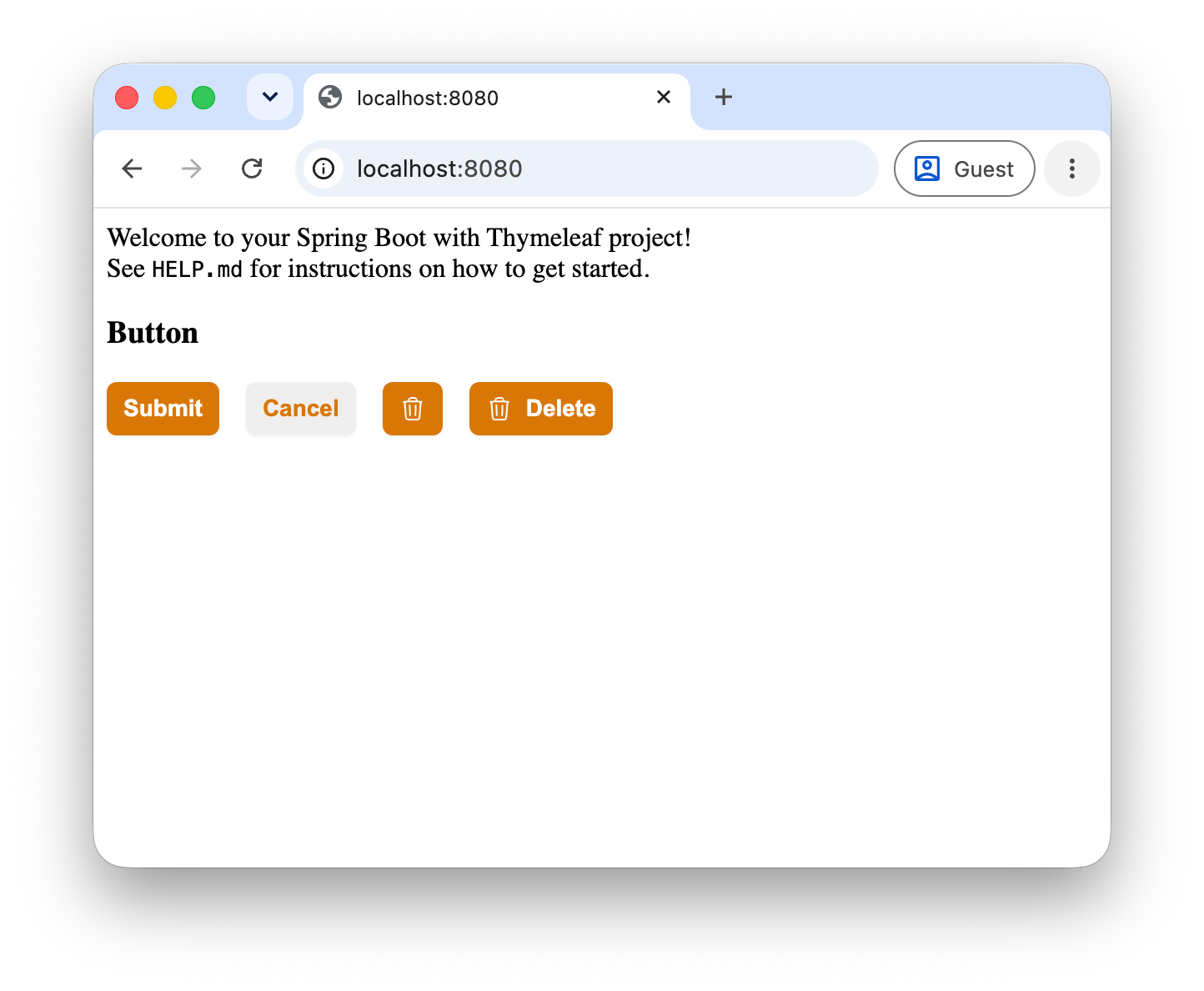
Use it from the sample application like this:
<div class="button-row">
  <tcl:button primary hx-post="https://test.com" class="extra-class">Submit</tcl:button>
  <tcl:button>Cancel</tcl:button>
  <tcl:button primary>
    <div>
      <!-- Trash icon from https://heroicons.com/ -->
      <svg xmlns="http://www.w3.org/2000/svg" fill="none" viewBox="0 0 24 24" stroke-width="1.5"
           stroke="currentColor">
        <path stroke-linecap="round" stroke-linejoin="round"
              d="m14.74 9-.346 9m-4.788 0L9.26 9m9.968-3.21c.342.052.682.107 1.022.166m-1.022-.165L18.16 19.673a2.25 2.25 0 0 1-2.244 2.077H8.084a2.25 2.25 0 0 1-2.244-2.077L4.772 5.79m14.456 0a48.108 48.108 0 0 0-3.478-.397m-12 .562c.34-.059.68-.114 1.022-.165m0 0a48.11 48.11 0 0 1 3.478-.397m7.5 0v-.916c0-1.18-.91-2.164-2.09-2.201a51.964 51.964 0 0 0-3.32 0c-1.18.037-2.09 1.022-2.09 2.201v.916m7.5 0a48.667 48.667 0 0 0-7.5 0"/>
      </svg>
    </div>
  </tcl:button>
  <tcl:button primary>
    <div>
      <!-- Trash icon from https://heroicons.com/ -->
      <svg xmlns="http://www.w3.org/2000/svg" fill="none" viewBox="0 0 24 24" stroke-width="1.5"
           stroke="currentColor">
        <path stroke-linecap="round" stroke-linejoin="round"
              d="m14.74 9-.346 9m-4.788 0L9.26 9m9.968-3.21c.342.052.682.107 1.022.166m-1.022-.165L18.16 19.673a2.25 2.25 0 0 1-2.244 2.077H8.084a2.25 2.25 0 0 1-2.244-2.077L4.772 5.79m14.456 0a48.108 48.108 0 0 0-3.478-.397m-12 .562c.34-.059.68-.114 1.022-.165m0 0a48.11 48.11 0 0 1 3.478-.397m7.5 0v-.916c0-1.18-.91-2.164-2.09-2.201a51.964 51.964 0 0 0-3.32 0c-1.18.037-2.09 1.022-2.09 2.201v.916m7.5 0a48.667 48.667 0 0 0-7.5 0"/>
      </svg>
      <span>Delete</span>
    </div>
  </tcl:button>
</div>
The result in the browser should look like this:
Conclusion
This concludes the third part of this series on writing a Thymeleaf component library. From this point on, we can add more components to the library, and use them in our applications. In the fourth and final part of this series, we will create an interactive component that uses AlpineJS for interactivity.
If you have any questions or remarks, feel free to post a comment at GitHub discussions.